
Practise small-boat radar at home
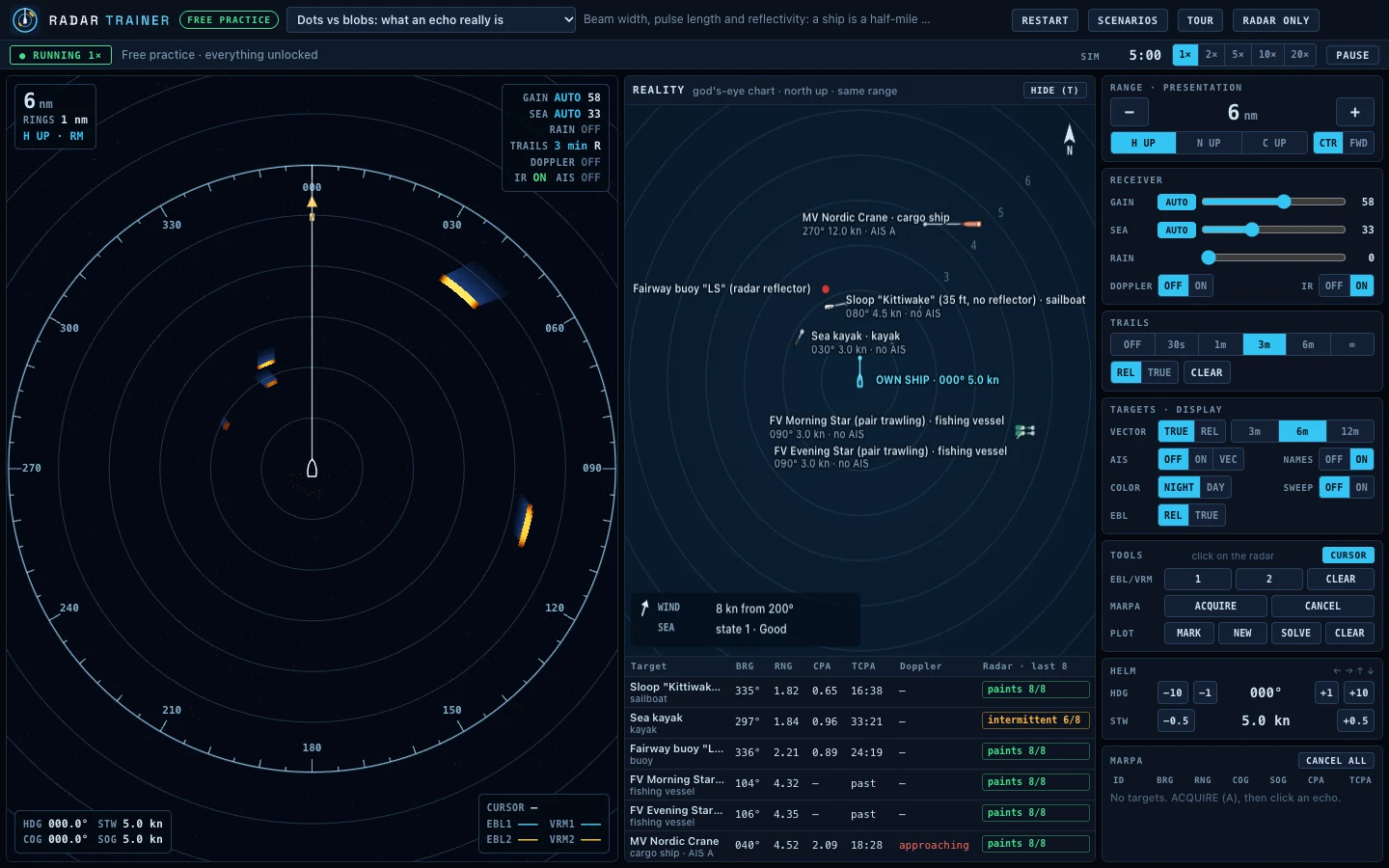
Radar Trainer is a simplified radar simulator in your web browser, for sailors who have done ASA 120 or a similar small-craft radar course and want to practise what they learned.
Use a laptop or desktop: the trainer is laid out for a large screen. There's nothing to install.
Who it's for
Sailors who have completed ASA 120 or an equivalent small-craft radar course, or who are well on the way through one.
It doesn't teach radar from the beginning. It assumes you already know what the EBL and VRM are for, how to plot a target's relative motion, and what the COLREGs ask of you in restricted visibility. It's a place to practise those skills ashore, between times on the water.
What you can practise
Each scenario is one situation, such as fog, a squall, a landfall or a harbour approach. Between them they cover:
-
Reading the picture
Echoes that don't look like what made them: a ship painting as a wide arc, a kayak flickering, and a buoy with a reflector outshining a sloop without one.
-
EBL and VRM
Taking ranges and bearings off echoes with the VRM and EBL, and watching for a steady bearing with closing range.
-
Trails and plotting
Relative and true trails, and timed plot marks on the screen to work out CPA and TCPA.
-
MARPA and Doppler
A MARPA track that lags after its target turns, and an uncoloured or “receding” Doppler echo that is still a risk.
-
Clutter and rain
Gain, sea and rain controls: finding a kayak in sea clutter and a yacht inside a rain shower.
-
AIS and radar
Class B position lag, boats with no AIS, and AIS icons with no echo under them.
-
Land, shadow and ghosts
A low beach that paints later than the hills behind it, a ship hidden behind a headland, false echoes near a big ship close by, and interference from another boat's radar.
-
Short range and hazards
Head-up and north-up in a harbour approach, and planning and steering a course that clears a rock.
-
Rules in restricted visibility
Rules 6, 7, 8 and 19 of the COLREGs, with action steps where you take the helm and see what happens.
How it works
Radar beside reality
The radar screen sits next to a reality view: a god's-eye chart of what is really out there, north up, at the same range. Read the radar first, then check yourself against it. A table shows how often the radar painted each target.
Guided mode
Questions pause the simulation, and reality stays hidden until you answer. Each answer is explained. The helm is locked, except in action steps: then you have it for a few minutes, and you're graded on the result, such as the CPA you actually achieved. A debrief ends each scenario.
Free practice
The same situation without questions. Steer, try any control, show or hide reality whenever you like, and run time at up to 20×. A separate free-play sandbox has mixed traffic, an island and a squall to try every control on.
The controls include range, gain, sea and rain, trails, Doppler, EBL/VRM, MARPA, a manual plot, an AIS overlay, and head-up, north-up and course-up.
What it isn't
- Not a course. It's a practice aid for skills you have already been taught. It doesn't replace a radar course, an instructor, or practice on the water with your own set.
- Not for navigation. Never use it to navigate or to make decisions afloat.
- A simplified simulation. It models a generic small-boat radar, roughly an 18-inch dome on a 30–40 ft sailboat, correctly installed and working. Echoes, clutter and detection ranges come from a simplified model and aren't calibrated to any real radar. Heel, mast shadow and installation faults are left out.
- Not your radar. Real sets differ in their controls, names, menus and behaviour, including how they colour Doppler and how quickly MARPA settles. Learn your own set from its manual.